How to add your Klaviyo SMS unsubscribes to BuzzBlaster
BuzzBlaster does not read SMS consent from Klaviyo, so export the people who cannot get SMS and upload them to your BuzzBlaster unsubscribe list. BuzzBlaster also never writes to Klaviyo, so people who tap a BuzzBlaster Stop link stay subscribed there.
Before you begin: you need a Klaviyo login that can export CSV files, and your Klaviyo account connected on the BuzzBlaster Integrations page.
What does BuzzBlaster read from Klaviyo?
The people in the lists and segments you pick, with their phone numbers. It does not read whether they agreed to SMS marketing, and it does not change anything in Klaviyo.
| Who unsubscribed | Skipped by BuzzBlaster? | Skipped by Klaviyo? |
|---|---|---|
| Through a BuzzBlaster Stop link | Yes, always | No, unless you add them there |
| In Klaviyo | No, unless you add them to BuzzBlaster | Yes |
Step 1: Pick only people who can get SMS
In Klaviyo, build the segment you send to with the condition If someone can or cannot receive marketing, set to can receive and SMS marketing. Then pick that segment on the BuzzBlaster New campaign page.
Step 2: Add Klaviyo unsubscribes to BuzzBlaster
- In Klaviyo, create a segment with If someone can or cannot receive marketing, set to cannot receive and SMS marketing.
- Open the segment, click Manage Segment and choose Export Segment to CSV. Keep only the phone number column in the file.
- In BuzzBlaster, click Settings, then Unsubscribe list.
- Under Import a CSV, drop the file on the box and click Upload list. The limit is 5 MB.
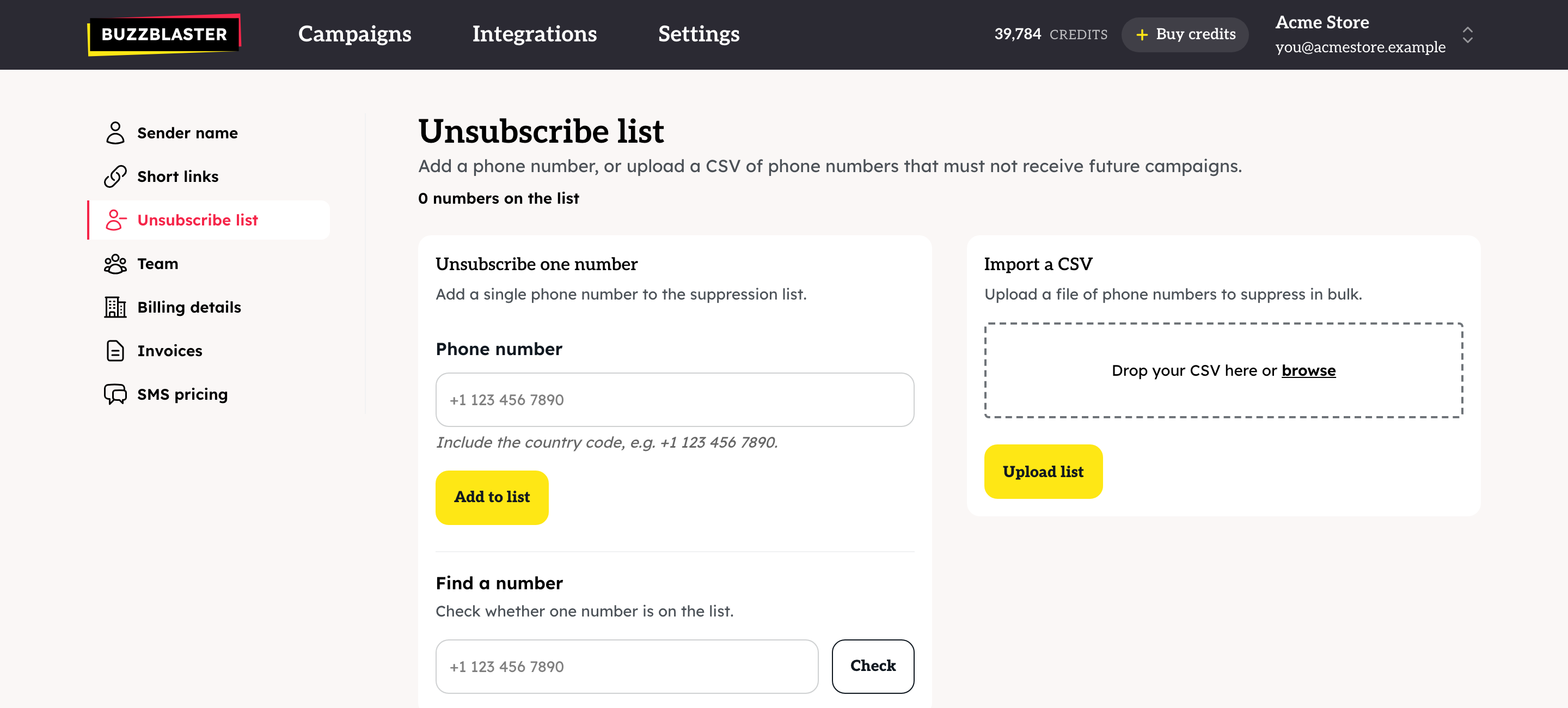
- Check how many numbers were accepted and rejected. Click Download rejected rows to see lines that could not be read.
Repeat this before a big campaign, because Klaviyo keeps collecting unsubscribes on its side.
Step 3: Add BuzzBlaster unsubscribes to Klaviyo
Do this only if you also send SMS from Klaviyo. BuzzBlaster has no download of the unsubscribe list. Contact support and ask for a copy for your organization, then mark those people as unsubscribed from SMS in Klaviyo.
Questions
A customer unsubscribed in Klaviyo but got my BuzzBlaster SMS. Add their number under Unsubscribe one number on the Unsubscribe list page, and follow Step 1 for your next campaigns.
Is the unsubscribe list shared between my organizations? No. Upload the file to each organization you send from.
Still stuck? Email support@buzzblaster.io, or open the account menu (top right) and click Contact support.