How to read your SMS campaign report in BuzzBlaster
Your SMS delivery report in BuzzBlaster is the campaign report: per country, how many SMS went out, and how often people clicked or unsubscribed.
Open it from the Sent list on the Campaigns page.
Open the report
- Click Campaigns in the top bar.
- In the Sent list, click the campaign name. The list already shows Recipients, Clicked, CTR and Unsub.

- Read the summary at the top, if there is one. Then read the table: one row per country and a Total row.
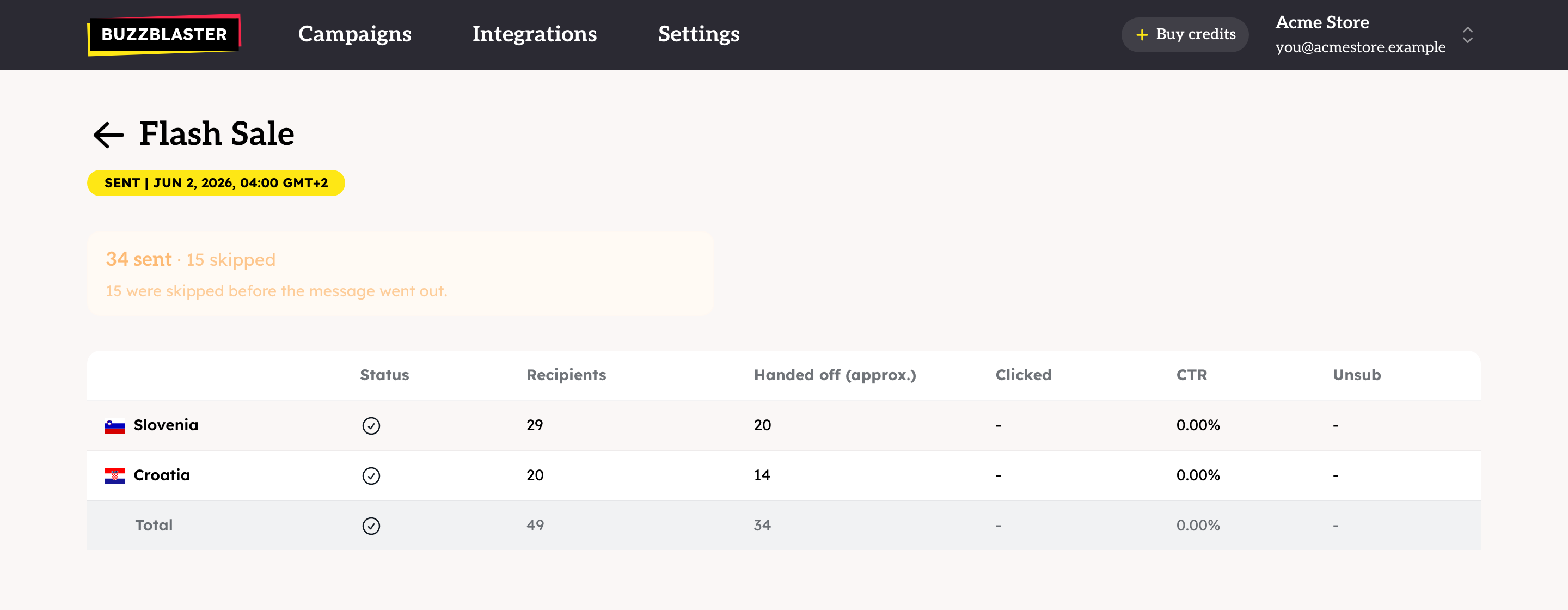
What does each column mean?
| Column | Meaning |
|---|---|
| Status | Where the send for that country stands, for example sent or stopped. |
| Recipients | People in the campaign for that country. |
| Handed off (approx.) | Messages passed to the phone networks. An approximate figure. It does not mean the phone confirmed delivery. |
| Clicked | Taps on the links in the message. Every tap counts, so one person who taps twice counts twice. |
| CTR | Clicks divided by recipients, as a percent. It can go above 100%. |
| Unsub | People who unsubscribed through the Stop link of this campaign. |
What does the summary above the table mean?
When some messages did not go out, a summary such as "34 sent · 15 skipped" appears above the table. It can name these groups:
| Word | Meaning |
|---|---|
| sent | Handed to the phone networks. |
| failed | Refused before it went out. Trying again would not help. |
| skipped | Not sent on purpose: the person unsubscribed, or you messaged them recently. |
| pending | Not tried yet. The campaign is still sending. |
| unclear | The network did not confirm the result. The message may have arrived, so BuzzBlaster never sends it again. |
No summary means every recipient was sent the message. To dig into messages that did not arrive, see How to find out why SMS were not delivered in BuzzBlaster.
Does the report show which SMS reached the phone?
No. The report shows what was handed to the phone networks, not a delivery confirmation per phone. Clicks and unsubscribes are the best sign that people got your message.
When are the numbers final?
- Clicks are counted for 30 days after the campaign's send time.
- Credits for skipped or failed messages come back to your balance after the campaign has finished.
Good to know
- Clicks are counted from the short links in your message. Add a link with https:// to measure clicks.
- The report shows counts only. There is no download of the report or of the numbers in it.
Questions
Why does it say "Nobody was reached"?
Every recipient was skipped: unsubscribed, or messaged recently. See How to skip contacts you messaged recently in BuzzBlaster.
Why are there no clicks in one country?
Check that the message for that country has a link. If clicks and unsubscribes stay at zero, contact support so we can check sending to that country.
Why do the numbers differ from my shop analytics?
BuzzBlaster counts every tap on its short links. Your shop counts visits and orders in its own way. See How to track SMS clicks in Google Analytics with BuzzBlaster.
Still stuck? Email support@buzzblaster.io, or open the account menu (top right) and click Contact support.