How to find out why SMS were not delivered in BuzzBlaster
To find out why SMS were not delivered in BuzzBlaster, open the campaign report and read the summary above the table: failed, skipped, pending or unclear.
Each group has its own cause and its own fix.
Before you begin
- The campaign must have started sending.
- The report shows what was handed to the phone networks. It does not show a delivery confirmation per phone.
Open the campaign report
- Click Campaigns in the top bar.
- In the Sent list, click the campaign name.
- Read the summary above the table, for example "34 sent · 15 skipped". If there is no summary, every recipient was sent the message.
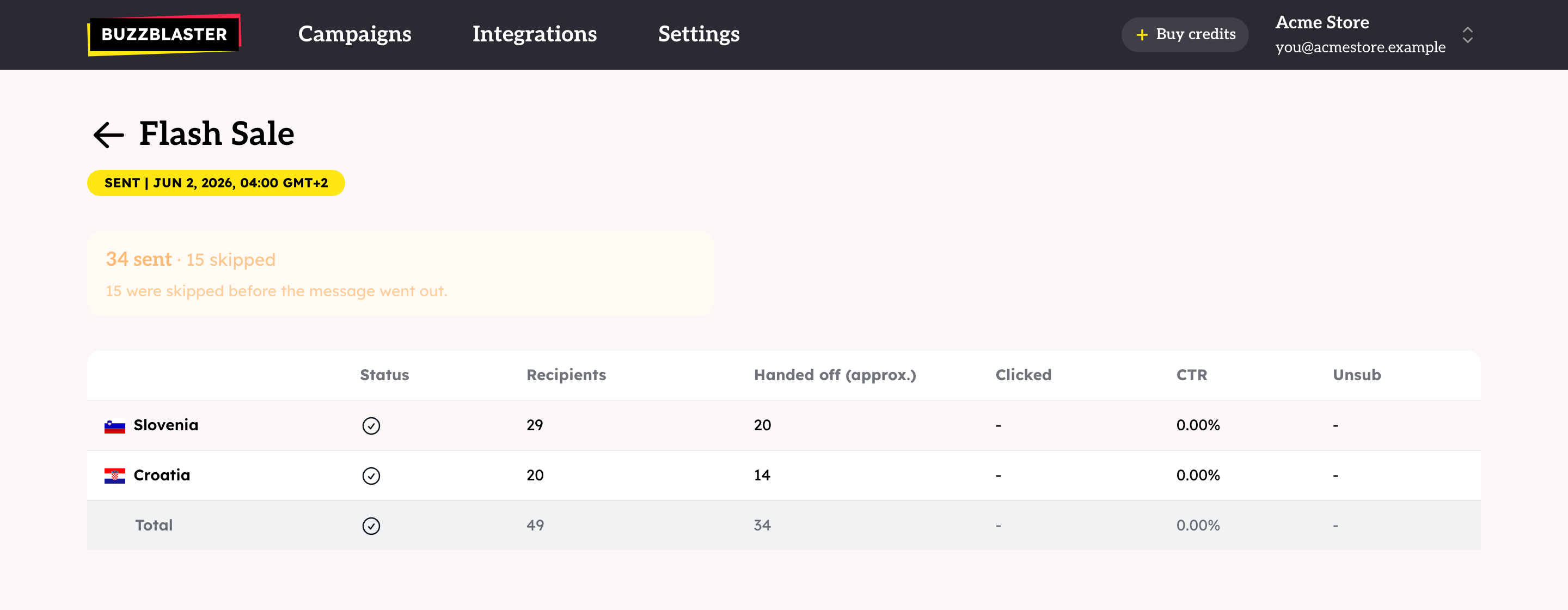
- Compare Recipients with Handed off (approx.) for each country to see where the gap is.
What does each group mean, and what can I do?
| Group | What happened | What to do | Credits |
|---|---|---|---|
| failed | The message was refused before it went out, and trying again would not help. | Check the numbers. If many numbers in one country fail, contact support. | Come back after the campaign finishes. |
| skipped | BuzzBlaster left the person out on purpose: they unsubscribed, or you messaged them recently. | Nothing. To skip fewer people, lower the hours in your sending preferences. | Come back after the campaign finishes. |
| pending | Not tried yet. The campaign is still sending. | Wait. | Come back if the message is never sent. |
| unclear | The network did not confirm the result. The message may have arrived. | Do not send it again by hand. BuzzBlaster never resends it either, so nobody gets it twice. | Stay charged. |
Why did a sent SMS not reach the phone?
A message counted as sent was handed to the phone network. It can still miss the phone, most often because the phone was off for a long time or the number no longer exists. The report does not show these per phone. A country with many recipients but very few clicks and unsubscribes is a sign of an old list there. Credits for sent messages stay charged.
Why does the report say "Nobody was reached"?
Every recipient was skipped before the message went out. Usually all of them had unsubscribed, or all of them got a message from you within your sending preferences window. See How to skip contacts you messaged recently in BuzzBlaster.
Questions
One country has very few clicks. Did the SMS arrive?
Check that the message for that country has a link. Then check when those customers last bought from you, and leave out people you have not heard from in a long time. If clicks and unsubscribes stay at zero, contact support.
My test SMS did not arrive.
See How to send a test SMS to your phone in BuzzBlaster.
Can I export the numbers that did not get the SMS?
No. The report shows counts only.
Still stuck? Email support@buzzblaster.io with the campaign name, or open the account menu (top right) and click Contact support.