How to send a bulk SMS campaign in BuzzBlaster
To send a bulk SMS campaign in BuzzBlaster, add recipients from Klaviyo or a CSV file, write one message per country, and schedule it with credits. It takes three steps: Recipients, Message and Schedule. Each message reaches people at the time you pick, in their own local time.
Before you begin: have your recipients ready as a Klaviyo list or segment, or as a CSV file of phone numbers. Fill in Settings → Billing details so you can buy credits at the end.
Step 1: Recipients
- On the Campaigns page, click New campaign.
- Type a Campaign name, for example "Spring sale". The name is also added to your tracking links, so keep it short.
- Choose From Klaviyo and pick one or more lists or segments, or choose From CSV file and upload your file.
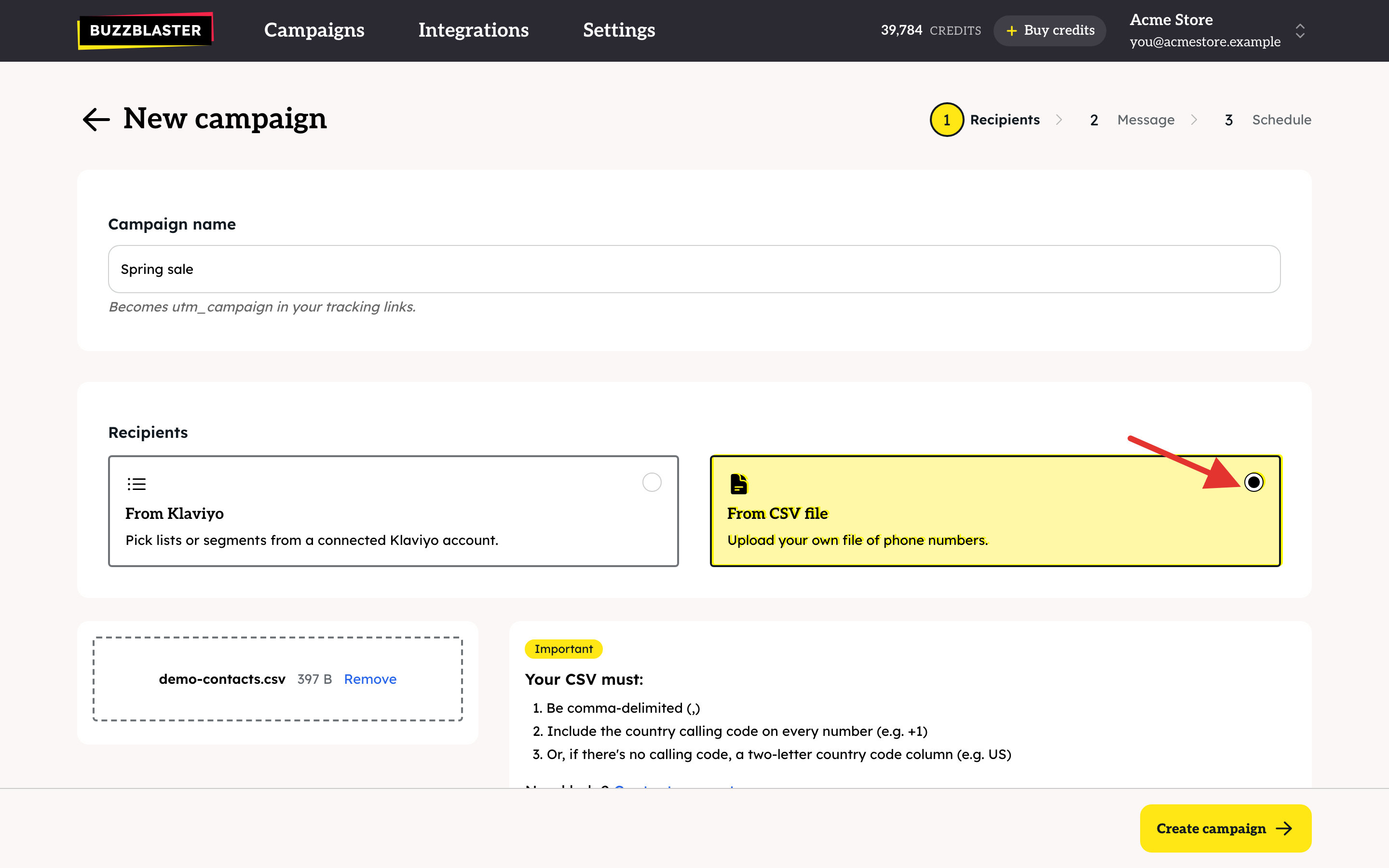
- Click Create campaign. For a CSV file you then check the columns and click Import contacts.
BuzzBlaster removes duplicates, invalid numbers and people who unsubscribed from you before. Then it groups the recipients by country.
Step 2: Message
- Write one message for each country. To use the same text in another country, copy it from one box, paste it into the next and translate it.
- Untick a country if you do not want to send there.
- Click Send me a test to see the message on your own phone.
- Click Schedule campaign.

Step 3: Schedule
- Choose Schedule for later and pick a date and time, or choose Send now.
- Check the cost in credits for each country and the total.
- If your balance is too low, click Buy and pay on the secure Stripe payment page. You come back to this screen afterwards.
- Click Schedule campaign (or Send campaign now).
What happens after I schedule?
- The credits are taken from your balance and the campaign moves to the Scheduled list.
- Each message is delivered at the time you picked, in the recipient's own local time.
- Open the campaign from the Sent list to see deliveries, clicks and unsubscribes.
- Credits for messages that were not sent come back to your balance after the campaign finishes.
How many people can one campaign reach?
Up to 1,000,000 recipients per campaign from a CSV file, in any of the 29 countries BuzzBlaster sends to. Numbers from other countries are left out, so you never pay for them.
Good to know
- BuzzBlaster adds a Stop line with an unsubscribe link to every message. You do not need to write it.
- Links in your message are shortened and tracked automatically.
- You can cancel a scheduled campaign until it starts sending. The credits come back.
Questions
Can I send the same campaign again? There is no copy button. Create a new campaign with the same recipients and paste your text.
My first campaign did not start at its time. New organizations get a one-time check before the first campaigns send. See How to fix a scheduled campaign that has not started sending in BuzzBlaster.
Still stuck? Email support@buzzblaster.io, or open the account menu (top right) and click Contact support.