How to stay within the SMS character limit in BuzzBlaster
One SMS in BuzzBlaster holds 160 characters, or 70 if the text has an emoji or a special letter, and the Message step counts both for you as you type. A longer text is sent in parts, and every part is charged.
Before you begin: create a campaign and add your recipients. See How to send a bulk SMS campaign in BuzzBlaster.
How many characters fit in one SMS?
160 plain characters fit in one SMS. A longer message is split into parts of 153 characters. The phone shows one message, but you pay for every part.
| Your text | One SMS | Each part of a longer message |
|---|---|---|
| Plain letters, numbers and common signs | 160 characters | 153 characters |
| Has an emoji or a special letter, for example č, ő or ł | 70 characters | 66 characters |
The box takes up to 640 characters. Your sender name in the text (in some countries) and the Stop line also count toward the length.
Write your message and watch the counters
- On the Message step, each country in your list has its own box, with the number of contacts next to the country name.

- Type your text in the box. Add a link to your shop with
https://in front. - Under the box, check Length, SMS (the number of parts) and, if there are any, Special characters.
- Check the phone preview on the right. It shows your sender name, your text with the shortened link, and the Stop line.
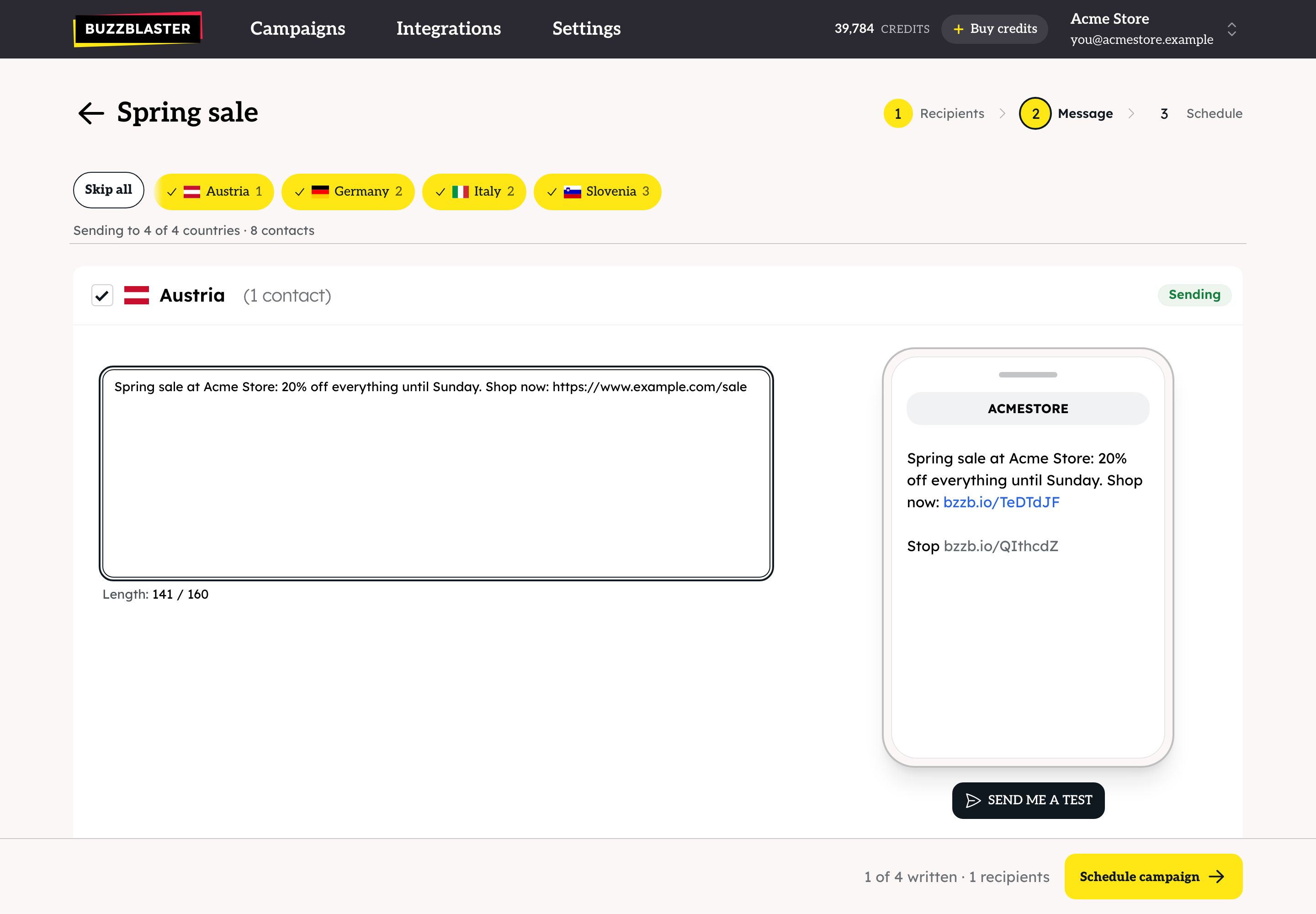
- Untick a country to leave it out. It shows "Won't send" and its contacts are skipped. Skip all and Send to all switch every country at once.
Your text saves by itself as you type. To use the same text in several countries, copy it from one box, paste it into the next and translate it.
Which characters make a message cost more?
- Emoji and special letters, such as č, ő, ł or Greek letters, switch the whole message to 70 characters per SMS. This can double the cost. The Special characters counter shows which ones you used.
- These signs count as 2 characters each: ^ { } \ [ ] ~ | €.
- Curly quotes and apostrophes (“ ” ‘ ’) are changed to straight ones before sending, so they do not raise the cost.
- Common accented letters such as é, è, à, ä, ö, ü, ñ and ß fit in the 160-character SMS.
The price per part depends on the country. See Settings → SMS pricing.
How are links counted?
- BuzzBlaster turns every link into a short link and adds tracking tags with your campaign name. The counters and the preview already show the short link.
- Do not use your own link shortener, such as bit.ly. Those links are blocked with "Shortened links are not allowed." Use the full link to your shop.
- To show your own domain in short links, see How to use your own domain for SMS short links in BuzzBlaster.
What is the Stop line?
BuzzBlaster adds a line Stop with a personal unsubscribe link to the end of every message. It is required by law and cannot be removed. You do not write it yourself, and it is part of the length you see. People who unsubscribe never get your campaigns again.
Warnings and blocks
The yellow Heads Up! box warns you when there is no link, when special characters raise the cost, or when the message is split into parts. You can still send.
A message cannot be scheduled until you fix these:
- "Shortened links are not allowed." Replace the link with the full link.
- "This message contains a link we could not verify is safe." Check the link for typos.
- "This message is too long to screen." or "This message contains more links than we can screen." Shorten the text or remove links.
Questions
The page says "Message does not include a link to your website." Add your link with https:// in front, or ignore the warning if you do not want a link.
The phone shows my name at the start of the text. In some countries your sender name is added to the message. See How to set your SMS sender name (sender ID) in BuzzBlaster.
My message has 161 characters. Do I pay for 2 SMS? Yes. Shorten it to 160 and it is one SMS again.
Still stuck? Email support@buzzblaster.io, or open the account menu (top right) and click Contact support.